It has been brought to our attention that recent versions of Mail on OS X (perhaps starting with 10.10, but definitely since 10.11), will re-download all of your email from your email server. And since your server doesn’t encrypt your email, that’s a serious concern.
This means that the following attack is possible to bypass Espionage’s protection of your email:
- While Mail’s folder(s) are locked and empty, open Mail.
- Follow the dialogs and allow Mail to import your messages.
- Wait for a while as your email is re-downloaded.
We do not believe this behavior existed in older versions of OS X, but we still should have noticed earlier. Our sincere apologies for not having done so ourselves, and our sincere thanks to the customer who reported this issue!
During our investigations, we were not able to find any folder that could be encrypted to prevent this from happening. This has lead us to conclude that Mail must be fetching account information directly from OS X’s keychain.
Mitigation
Unless Apple changes their code for Mail.app, there doesn’t appear to be a way to prevent it from using the credentials in OS X’s Keychain to re-download all messages—where, we should emphasize, they are unencrypted.
There are at least three mitigations:
Option #1: Move messages to the “On My Mac” section
In the sidebar on the left that shows all of your accounts and mailboxes, there should be a section that says “On My Mac”:
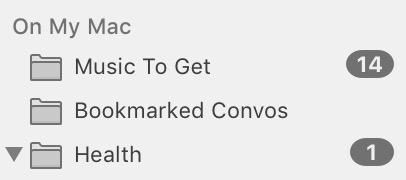
If this section is missing you can make it to appear by creating a new “local” folder via the Mailbox menu: Mailbox > New Mailbox… and then: Location: On My Mac.
All folders in this section correspond to folders only on your Mac (and not the server). Therefore, any messages moved into these folders should disappear from the server and won’t be re-downloaded by Mail.
You can use Mail’s Inbox Rules (via the Preferences) to automatically move messages to one of these local folders. The downside is these messages will not be synced to your other devices.
Option #2: Use GPGTools to encrypt messages
You can use the wonderful GPGTools software to store, send, and receive messages that are encrypted even on the server. However, this approach isn’t for everyone as it may be somewhat less user-friendly, and it requires that the recipient also be using GPG.
Option #3: Don’t use Mail.app
Use an email app that either does not store its credentials in the Keychain, or (if it does) does not re-download everything if its primary data folder is missing.
You can verify this yourself by encrypting the data folder of an app like Thunderbird and then opening the app while its folder is locked. If it does not re-download everything, then at least the messages on your computer should be safe. The messages on your email server or on your friend’s computers… are a different story.
Conclusion: Email Must Die
I have spent a good portion of my life attempting to fix email and on the general problem of secure messaging. You’d think this would be easy, right? Wrong!
Here’s what my quest has involved so far:
- Started a company to support the development of a generic folder encryption product (Espionage).
- Starting a non-profit, which led to the creation of DNSChain and various offspring projects.
- Diving deep into blockchain technology.
- Creating an open-source project to simplify self-hosting and migrating your email.
Yet here I am, 8 years later… Email is still an unsolved problem and it is only getting worse. The complexity of self-hosting means more people are relying on companies like Google and Microsoft, and this has led to a centralization of the entire system. These entities are now using their position to further discourage self-hosting by (possibly illegally) dropping or junking email from correctly setup email servers, using spam as an excuse to secure their monopoly.
It’s because of this that I’ve come to the conclusion that email must die.
I’ll leave you with a few email related tweets:
1/ Email is one of the worst communications systems ever invented. SPF, DKIM, SMTP, POP3, IMAP, plaintext, insecure, broken nightmare.
— Greg Slepak (@taoeffect) March 3, 2015
2/ Google and other hosting companies *LOVE* this broken system because it makes everyone depend on them for this service. Locks ‘em in.
— Greg Slepak (@taoeffect) March 3, 2015
3/ I am seriously starting to think that maybe the best thing to do with email might be to just get rid of it.
— Greg Slepak (@taoeffect) March 3, 2015
Looks like I correctly predicted @Yahoo would fail to meet end-of-year deadline to end-to-end encrypt all email.https://t.co/wJg2QL4k4i
— Greg Slepak (@taoeffect) January 1, 2016
Email died somewhere around here, possibly well before then: https://t.co/RihepnBryrhttps://t.co/y39DRdmgYA
— Greg Slepak (@taoeffect) February 13, 2016