Restoring folders from Espionage's backups
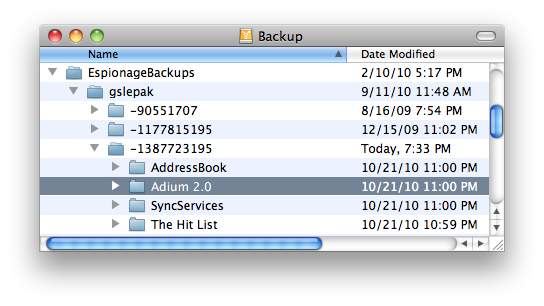
Backups are stored in a folder called EspionageBackups, at the location that is specified as the destination for Espionage's backups. This folder is organized like so:
The numbered folders are used to prevent conflicts between backed up folders that have the same name (but are located in different locations on your computer).
Here's an example layout:
Example: Restoring Email
Let's say our email got corrupted and we wanted to restore Apple's Mail folders ("Mail" and "Mail Downloads"). We need to replace these folders with the backed up versions.
- In Espionage, use the Enabled checkbox to disable both the "Mail" and "Mail Downloads" folders.
- Look inside the numbered folders inside of the EspionageBackups folder until you find the "Mail" and "Mail Downloads" folders. (Remember, they may appear to be empty).
- Drag both folders into the Library folder, which contains the corrupt "Mail" and "Mail Downloads" folders, to replace them.
- Back in Espionage, enable both folders using the Enabled checkbox.
Example: Recovering a folder no longer in Espionage
If, for some reason, the folder you want to restore is no longer in Espionage, but you have a backed up version of it, then you can simply copy the backed up folder to some location on your computer, and then drag and drop it onto Espionage to make Espionage aware of it. Espionage should detect that the folder is "already encrypted", and you'll just need to enter the password that was originally used to encrypt it.
Do not directly add folders inside of the EspionageBackups directory into Espionage. Make sure to copy them out to some other location first.