

Because Espionage time a folder is locked or unlocked, Time Machine may end up backing up more than it needs to.
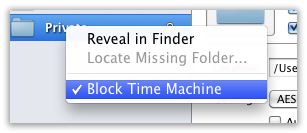
To ensure efficient backups with Time Machine, you can either make sure to run Time Machine when all folders are in the same locked state as they were during the previous backup, or, now with 2.8 you can prevent Time Machine from backing up a folder altogether (and use Espionage’s backups instead) for specific folders:
Stay tuned for more improvements in this area…